
AMS Integrations: 6 Connections Your Association Needs
AMS Integrations: 6 Connections Your Association Needs in 2026
By Grant Carpenter, Content & Growth Strategist · Updated · Originally published July 2019
AMS integrations are connections that let your association management software (AMS) share data automatically with the other tools your team uses, so nobody has to re-enter it. The ones that matter most in 2026 are accounting (QuickBooks Online), email marketing, social media, website advertising, specialized tools through an open API and single sign-on, and AI assistants.
| Integration | What it does | Why associations need it |
|---|---|---|
| QuickBooks Online | Two-way sync of members, invoices, payments, and sales receipts between your AMS and your books | No double entry, fewer errors, and cleaner numbers for your board |
| Email marketing | Keeps Mailchimp or Constant Contact lists and member groups in sync with your member database | The right message reaches the right members without exporting a single list |
| Social media and video | Embeds social feeds and video on your website and adds social links to member profiles | Keeps your site fresh and meets members where they already spend time |
| Google Ad Manager | Serves and tracks ads on your association website | Non-dues revenue from companies that want to reach your members |
| Open API, SSO, and Zapier | Connects your LMS, online community, event, advocacy, and job board tools, with one member login | Keep the specialized tools you love without separate logins or out-of-date data |
| AI tools (MCP) | Lets AI assistants like Claude and ChatGPT securely read your association data | Staff get answers from live member data in the AI tools they already use |
Your association succeeds whenever you're able to expand programming for your members, utilize the strengths of your team members to simplify the management process, and save time and energy. The right software solutions will help you achieve these goals so that you can spend time on what's most important: creating engaging programming that facilitates your members' professional development.
Software integrations provide you with solutions to meet many of your association's needs. When you're using several systems that each specialize in one or a few features, creating the connections that allow them to communicate with each other helps your association save time without sacrificing the quality of your work. Integrating several best-in-class solutions will provide more functionality than a single generalized solution.
If your association is already using software systems that work especially well for you, the adoption of a new platform such as an upgraded AMS shouldn't stop you from continuing to use your other systems. This is why it is so important to choose an AMS provider that will work with your association's team to determine the integrations you need and help you create them.
While the needs of each association are different, there are a few key integrations that can help anyone manage information more efficiently and better connect with members. Let's take a look at some of the most important integrations your association should consider when adopting a new AMS.
You'll want to think about integrations with software such as:
- Why should your AMS integrate with QuickBooks Online?
- Can your AMS connect to your email marketing platform?
- How should your AMS connect to social media and video?
- Can your AMS help you earn non-dues revenue with Google Ad Manager?
- How do you connect your AMS to your LMS, community, and other specialized tools?
- Can your AMS connect to AI tools like Claude and ChatGPT?
For most if not all associations, accounting is a central component of your recurring activities and can oftentimes become burdensome for your team members. This is why it is essential that you integrate your new AMS with your existing accounting software.
1. Why should your AMS integrate with QuickBooks Online?
Short answer: A QuickBooks Online integration syncs dues, event registrations, and store purchases between your AMS and your books automatically, so your team stops entering every transaction twice. That saves hours each month and cuts down on the errors that come with manual entry.
From dues payments to event registration and purchases made through your eCommerce platform, financial transactions are necessary to your association's continuation and provide you with the resources needed to expand your offerings for your members. Integrating your AMS and your accounting software makes financial transactions more secure and saves your accounting team a significant amount of time in the process.
Mention accounting to the members of your team who are responsible for this vital but often tedious component of association management, and they'll almost certainly tell you that they wish the process could be faster. A quicker, easier process is one of the central benefits of an AMS that integrates with QuickBooks Online.
Integration with QuickBooks provides your association with:
- Two-way sync: Financial transactions and member records created in one system show up automatically in the other. New transactions in your AMS are written to QuickBooks Online the moment they're created, and changes your bookkeeper makes in QuickBooks come back within minutes. This eliminates the need for manual data entry.
- Faster financial processes: You'll be able to create invoices, receive payments from members, process their credit cards, and make necessary changes to their financial records from either system.
- Line-item detail: Invoices, payments, credit memos, and sales receipts sync with their full detail instead of being rolled into summary journal entries, so you can always see which member paid for what.
- Professional guidance: Your association will benefit from your QuickBooks integration whether or not you have accounting professionals on your team. QuickBooks Certified ProAdvisors and Advanced Certified ProAdvisors will be able to meet your team members at their current level of experience and provide advice on improving their accounting process.
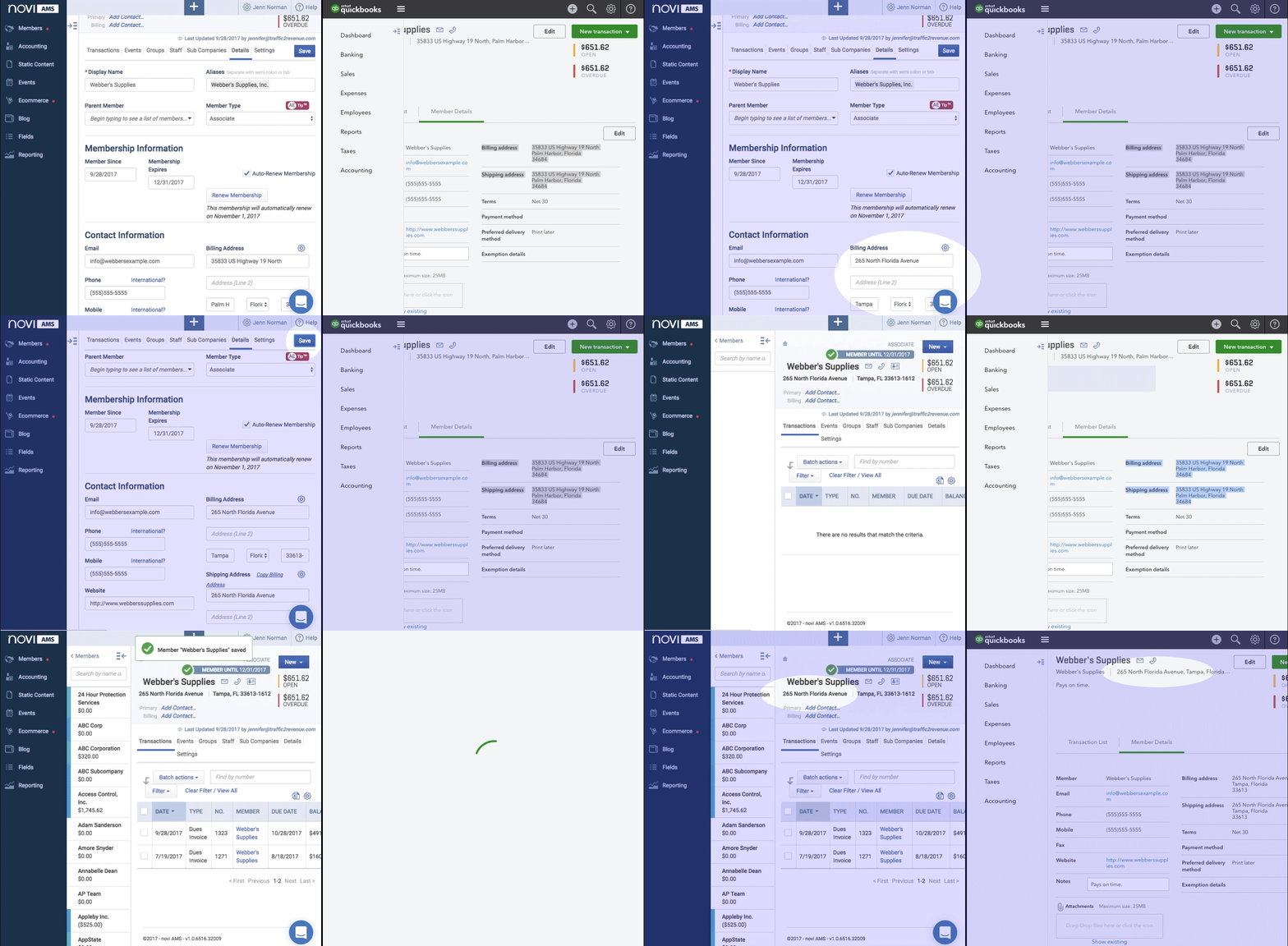
The increased security that integration brings to your accounting process is just as important as the time your team members save. Integrating your AMS with QuickBooks significantly reduces opportunities for erroneous or lost data due to human error during manual entry.
Integrating your AMS and accounting platform has the added benefit of improving the latter system. Your AMS augments your accounting platform with tools tailored to the specific financial needs of associations, making QuickBooks work better for you.
One thing to know before you start: Intuit is phasing out QuickBooks Desktop, so look for an AMS built for QuickBooks Online. If you're still on Desktop, plan to move to QuickBooks Online first and connect your AMS during onboarding.
If your association would like to look into an AMS that facilitates easier accounting through integration with QuickBooks, you may want to learn more about Novi AMS's QuickBooks Online integration. It's effective, trustworthy, and sure to benefit your members and your team.
"The QuickBooks Online Integration is a game changer. There is nothing else like it!"
Chip Tatum, Apartment Association of Greater Orlando (AAGO)
In addition to integration with your accounting platform, you'll want to look for another time-saver as you choose your new AMS: integration with your email marketing platform.
2. Can your AMS connect to your email marketing platform?
Short answer: Yes. A good AMS syncs your member data with email platforms like Mailchimp and Constant Contact, so your lists update themselves whenever members join, lapse, or change their email address. Other email tools can usually connect through an open API or a middleware tool like Zapier.
Communication via email is crucial to nearly every aspect of member engagement, from inviting them to your next event to marketing your eCommerce offerings to sharing news related to your association. It's likely that your association is already using a top email marketing platform such as Constant Contact or Mailchimp to reach out to large groups of members at once. You can integrate this platform with your AMS to maintain your current email strategy and make it even more efficient.
Email distribution lists and membership rosters can change, especially as your membership base expands, and your association must grow to meet their needs. It's essential that you stay updated with the most current lists of members and accurate contact information. Manual updates to these lists are tedious to create and prone to human error such as inaccurate or lost data.
Luckily, you can keep your email lists updated automatically by integrating your AMS with your email marketing platform. You'll be able to:
- Access the most up-to-date information on all of your members: Whenever members log in to their portals to update their contact and personal information, including their email addresses, these changes will automatically be reflected in your email marketing list.
- Segment your email lists: Ideally, different communications will be directed toward different groups of members rather than everyone who belongs to your association. You'll be able to access and search an updated list of member emails from either your AMS or your email marketing platform.
- Reach out to specific groups of members: In addition to segmented email lists, you can also create member groups within your AMS and use your email platform to communicate with those groups.
Constant Contact and Mailchimp, widely considered some of the most effective email marketing platforms in the industry, are popular among association professionals and work well for both tech-savvy and novice users. Novi AMS has built-in integrations with both of these platforms, meaning that they're ready to use. There is no extra work necessary for your team, as the sync begins automatically.
Associations using email marketing platforms other than Constant Contact or Mailchimp can also integrate their existing software solution with their AMS through a custom integration. Make sure that your association chooses an AMS provider that will work with your team to help you determine the best ways to achieve your communication and marketing goals and create the integration you need.
While emails are one of the most efficient and effective means of staying in contact with your members, social media provides plenty of additional opportunities for engaging them. Integrate your AMS with your association's social media platforms to stay connected with your members wherever they may be.
3. How should your AMS connect to social media and video?
Regardless of any personal feelings you may harbor about social media, you can't deny its influence, its popularity, and its convenience as a method of staying in touch with your members. Social media provides your association with additional marketing opportunities and increases the number of ways you can communicate with your members. This keeps them engaged and motivates them to get involved in everything your association has to offer.
Choose an AMS that helps your association meet your members where they already are: on social media! You'll want to select a system that:
- Links to your association's Facebook, LinkedIn, Instagram, and X (formerly Twitter) accounts: Stay connected to your members on social media by providing them with links to your accounts on these widely-used platforms. Social media sites are excellent places to post news about your association and upcoming opportunities such as event registration.
- Embeds a social feed on your website: An automatically updated social feed keeps your website's content fresh and your site visitors up-to-date on news related to your association. This is a great way for members who may not spend as much time on social media to stay informed about how they can get involved in your programming.
- Allows members to add social media information to their profiles: Your members and your staff can help keep your database updated by adding social links directly to profiles in your member directory.
See how Novi connects to the tools you already use
We'll walk you through QuickBooks Online, Mailchimp, Constant Contact, our Open API, and Novi Connect on a live demo.
Schedule a DemoTo create more engaging social media and website content, your association may want to incorporate multimedia elements including videos hosted on sites such as YouTube and Vimeo. Embedding videos throughout your website and on your social media profiles is an effective means of getting site visitors' attention and encouraging further engagement with your association.
In addition to helping your association increase member engagement, social media integrations can also help you boost revenue by marketing to your members. Additionally, your association can increase non-dues revenue through advertisements when you integrate your AMS with Google Ad Manager.
4. Can your AMS help you earn non-dues revenue with Google Ad Manager?
Short answer: Yes. Connecting your AMS website to Google Ad Manager lets you sell ad space to companies that want to reach your members, or let Google fill it for you. It's a free tool, and it turns your website traffic into steady non-dues revenue.
Non-dues revenue is essential to helping your association expand your programming and serve your members in new and innovative ways. You can boost non-dues revenue by selling tickets to conferences and events, offering branded merchandise to your members, and incorporating advertising on your association website.
Advertising on your association website does more than provide your association with some of the financial resources you need to maintain and expand your offerings. It can also be helpful to your members when the products and services advertised are relevant to your members' professional interests.
Additionally, within trade associations, member companies can advertise to their colleagues through featured listings in your member directory, benefiting both their businesses and your association as a whole.
To make the most of advertising opportunities on your association's website, integrate your AMS with Google Ad Manager. It's a free service your association can use to sell advertisements and boost revenue, with two options depending upon your association's needs and capabilities. You can:
- Sell your own advertisements: Using this method, your association keeps 100% of the revenue from ads you sell directly to sponsors and member companies.
- Let Google sell advertisements: Google fills your ad space through programs like AdSense, saving your team valuable time. You'll receive a share of the ad revenue.
Google's analytics and reporting tools also help your association better understand which advertisements and components of your advertising strategy are working most effectively. You can use this information to adjust your strategy as necessary to bring in the most advertising revenue for your association.
Google's reporting data is accessible to the other members of your association's team, meaning that you can make the creation and development of your advertising strategy a collective effort. To further improve your strategy, you can import data from your AMS and other software systems you may be using to develop targeted marketing efforts that are relevant to the interests and needs of your members.
More ways of collecting non-dues revenue with the help of your AMS include eCommerce, featured directory listings, online sponsorships, and job boards.
Integrations with your accounting software, email marketing platform, social media accounts, and advertising tools are essential to the success of your new AMS and your association's overall strategy. However, these aren't the only software integrations you'll benefit from. If you're using any other particularly helpful solutions or plan to in the future, it's important to choose an AMS that will facilitate the creation of the integrations you need.
5. How do you connect your AMS to your LMS, community, and other specialized tools?
Short answer: Look for an AMS with an open API, single sign-on (SSO), and support for no-code tools like Zapier. Together, they let your learning management system, online community, event platform, and advocacy tools share member data with your AMS, and let members use one login for all of them.
While the AMS your association chooses will come ready to integrate with some of the most popular and effective software solutions available to you, these integrations alone may not address all of your association's management needs. Because the needs and corresponding software solutions for every association are different, you'll want to select an AMS that has the APIs needed for you to create custom integrations with all of your most helpful systems.
Look for an AMS that offers fast and secure external APIs so that you can integrate your new system with the software solutions you're currently using. If you're not familiar with APIs or require more advanced customization than they provide, it's especially important to choose a software provider capable of working with your team to create custom integrations with the solutions that are already helping your association run effectively. Just keep in mind that these custom integrations will likely be priced outside of the annual license/subscription fee.
Here's what to look for in 2026:
- An open API: Two-way APIs that can read and update membership records, event registrations, store orders, and custom fields, with webhooks that alert connected systems the moment a record changes. Novi's Open API works this way.
- Single sign-on (SSO): Members use their association login to get into your LMS, job board, or advocacy platform, and your AMS tells that tool who they are and whether their membership is current. Look for support for standards like OAuth 2.0 and OpenID Connect.
- No-code connections: Middleware like Zapier connects your AMS to thousands of apps without a developer. For example, every new member can be added to a Slack channel or a Google Sheet automatically.
- Integration partners: For bigger projects, partners who build and maintain custom connections for you.
It's likely that your association's team doesn't have many, or even any, software developers, and that's alright! Your AMS provider is there to help when it comes time to determine which integration solutions are best for your association and how you'll go about creating them.
Examples of software solutions your association may want to integrate include:
- Advocacy software
- Online communities and forums
- Learning management systems (LMS)
- Conference, abstract, and trade show platforms
- Job boards and career centers
- Your national or state organization's membership system, if you're part of a federation
You can browse the full list of tools that already connect to Novi, organized by category, on our third-party integrations page.
If your association is ready to work with your AMS provider to create a custom integration, you'll get started by holding a meeting between your team and your provider's team. In this consultation, you'll work together to define the use case for the proposed integration. You'll identify the intended end result for the integration so that your provider can determine the best way to go about creating it.
When it comes to adopting a new AMS, customization is key. Your software provider should be someone who is available to work with your team and offer their help in creating the integrations necessary for a successful implementation and improved association management practices.
6. Can your AMS connect to AI tools like Claude and ChatGPT?
Short answer: Yes, if it supports the Model Context Protocol (MCP), an open standard that lets AI assistants securely connect to other software. With Novi, that connection is Novi Connect™, part of Novi's Amplify AI features, which lets staff ask Claude or ChatGPT questions about their live association data.
This is the newest integration on the list, and it's quickly becoming one of the most useful. Your team is probably already using an AI assistant to draft emails or summarize meeting notes. The catch is that the assistant doesn't know anything about your members unless someone copies and pastes data into it.
An MCP connection fixes that. Instead of exporting a report, a staff member can ask something like "Which members haven't registered for an event this year?" right in Claude or ChatGPT and get an answer pulled from your AMS.
Because this is your member data, security matters. Here's how Novi Connect handles it:
- It stays off until an association administrator turns it on.
- Each staff member signs in with their own Novi login and approves access, with multi-factor authentication if you use it.
- Its tools are read-only, and it sends only the data needed to answer each question.
- Removing someone's Novi admin access ends their connection, too.
Amplify is included with Novi at no extra cost. If you turn on Novi Connect, we recommend using a paid AI account with model training turned off.
With the right AMS and integrated software solutions, your association will be more capable than ever of providing your members with the best possible experience and making work much easier for your team.
Keep the tools you love. Connect them to one AMS.
Tell us what your association uses today, and we'll show you how it connects to Novi.
Schedule a DemoChoosing a new AMS and working with your provider to create integrations is a significant undertaking that requires your team to do their research. The following additional resources offer more information to help you make the right choice for your association.
- Membership Management Tools: 8 Software Features to Know: As you compare your options for your next AMS, keep an eye out for the essential features listed in this helpful guide from Novi AMS.
- re:Charity's Top Association Management Software | Our Favorites: Ready to get started comparing AMS options for your association? Check out the top picks offered in this guide from re:Charity.
- The Ultimate Guide to Membership Management Software: Learn more about choosing the right AMS for your association and how you can make the most of your software's features with this guide from Novi AMS.
Frequently Asked Questions
▸ What are AMS integrations?
AMS integrations are connections that let your association management software share data automatically with other tools, like your accounting software, email platform, learning management system, or AI assistant. They keep member data consistent everywhere, so your team doesn't have to re-enter it or export and import lists.
▸ Does Novi AMS integrate with QuickBooks Online?
Yes. Novi AMS has a direct, two-way integration with QuickBooks Online. New transactions are written to QuickBooks the moment they're created in Novi, and changes made in QuickBooks sync back within minutes, with full line-item detail. Novi doesn't connect to QuickBooks Desktop, which Intuit is phasing out, so Desktop users move to QuickBooks Online first.
▸ Can my AMS connect to my email marketing platform?
Most modern AMS platforms can. Novi AMS integrates natively with Mailchimp and Constant Contact, so member lists and groups stay in sync automatically. Other email platforms can usually connect through an open API or a no-code tool like Zapier.
▸ What's the difference between a native integration and an open API?
A native integration is built and maintained by your AMS provider, so you just turn it on, like Novi's QuickBooks Online, Mailchimp, and Constant Contact integrations. An open API lets your developer or an integration partner build a custom connection to almost any other tool, such as an LMS, trade show platform, or federation membership system.
▸ Can I connect my AMS to Claude or ChatGPT?
Yes, if your AMS supports the Model Context Protocol (MCP). Novi Connect, part of Novi's Amplify AI features, lets staff use Claude or ChatGPT with their live Novi data. An administrator turns it on, each user signs in with their own Novi login, and its tools are read-only.
▸ Do I need a developer to integrate my AMS with other software?
Not usually. Native integrations and no-code tools like Zapier cover most of what associations need without a developer. For specialized workflows, your AMS provider or an integration partner can build a custom connection using the AMS's API.